
About the Kerala PSC Thulasi Portal
Kerala Public Service Commission (KPSC) is the government body responsible for recruitment to various state government services in Kerala. All applications to Kerala PSC exams are handled through the Thulasi portal — the online one-stop platform for candidates to create a profile, apply for posts, and track their application status.
The Thulasi portal uses a single candidate profile for all Kerala PSC applications. This means the photograph you upload to your Thulasi profile will be used across all the exam notifications you apply for — making it critically important to get the photo right from the start.
Unlike national exam portals (NEET, JEE, SSC) where each application has its own photo upload, your Thulasi profile photo is permanent and shared across all applications. If your photo is wrong, it's wrong for every exam you've applied for — until you go through the correction process.
What Makes Kerala PSC Photos Different
Kerala PSC has two requirements that are unique among major Indian exam portals:
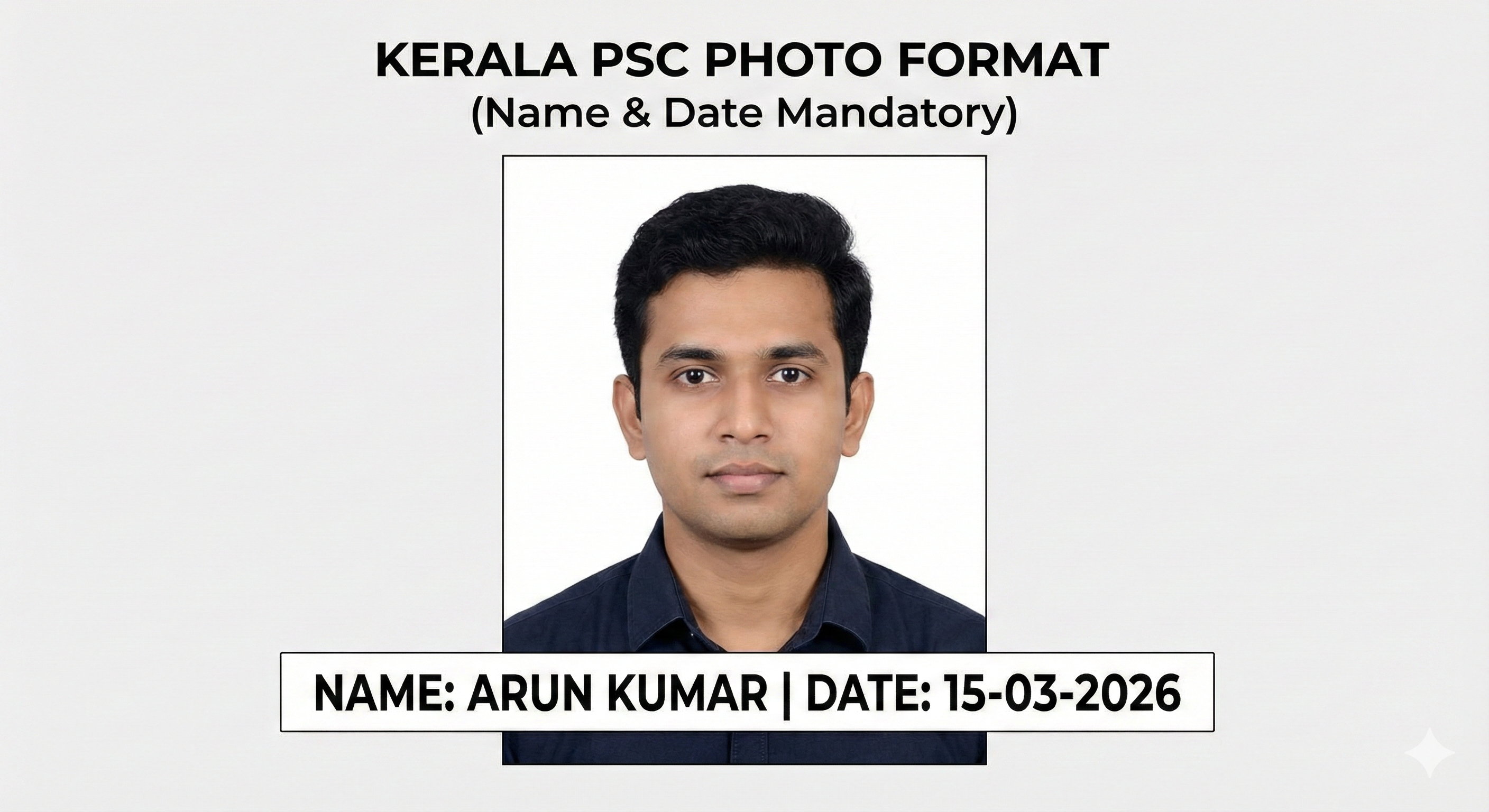
- The mandatory name and date stamp band — a white rectangular strip at the bottom of the photograph containing the candidate's name and the date the photo was taken, printed in black text.
- Very strict file size limit — maximum 30 KB, which is far smaller than NTA's 200 KB or UPSC's 300 KB limit. This requires aggressive compression without sacrificing visible quality.
These two requirements together mean that most standard passport photos cannot be directly uploaded to the Thulasi portal. The date stamp must be added, and the file must be heavily compressed.
Photo Specifications
| Parameter | Requirement |
|---|---|
| Pixel Dimensions | 150 × 200 pixels (width × height) |
| File Format | JPG / JPEG only |
| File Size | Maximum 30 KB (portal rejects above this) |
| Background | Plain white — no patterns, no color |
| Face Position | Centered, face occupying top 70–80% of frame |
| Expression | Neutral, mouth closed, eyes open |
| Photo Recency | Taken within the last 6 months |
| Spectacles | Allowed if worn regularly; no tinted lenses |
| Cap/Hat | Not allowed |
| Date Stamp | Mandatory — candidate name + date at bottom |
Name & Date Stamp — The Most Important Rule
This is the most unique and most commonly violated requirement for Kerala PSC. The photograph must have a white rectangular band at the bottom with the following information printed in black:
- Your full name (as it appears on your application)
- The date the photograph was taken (in DD/MM/YYYY format)
What the Stamp Must Look Like
- The band should be at the very bottom of the photograph
- The text must be clearly legible at the 150×200 px resolution
- The text must be in black on a white background
- The band should not cover the face or any significant portion of the image
- Font size should be small but readable — approximately 8–10pt equivalent at the final resolution
Step-by-Step Photo Preparation
- Take a passport-style photo: White background, rear camera, good front lighting, both ears visible, neutral expression. The studio can provide the physical copy, but get the digital file as well.
- Transfer to computer: Use USB or email — avoid WhatsApp as it compresses images.
- Open MyExamPhoto: Go to MyExamPhoto with Kerala PSC preset. Upload your photo.
- Enter name and date: In the "Name" field, type your full name exactly as in your application. In the "Date" field, enter the date the photo was taken (DD/MM/YYYY).
- Process and download: Click "Download". The tool outputs a 150×200 px JPG with the date stamp at the bottom, compressed to under 30 KB.
- Verify file size: Right-click → Properties. The file must be under 30 KB. Aim for 20–28 KB for a comfortable margin.
- Preview the image: Open the file in any image viewer. Verify: the face is clearly visible, the name and date are readable, background is white.
📸 Before You Upload Your Photo
Don't risk application rejection! Use our free tool to resize your photo to exact exam specifications.
Create Perfect Exam Photo →