
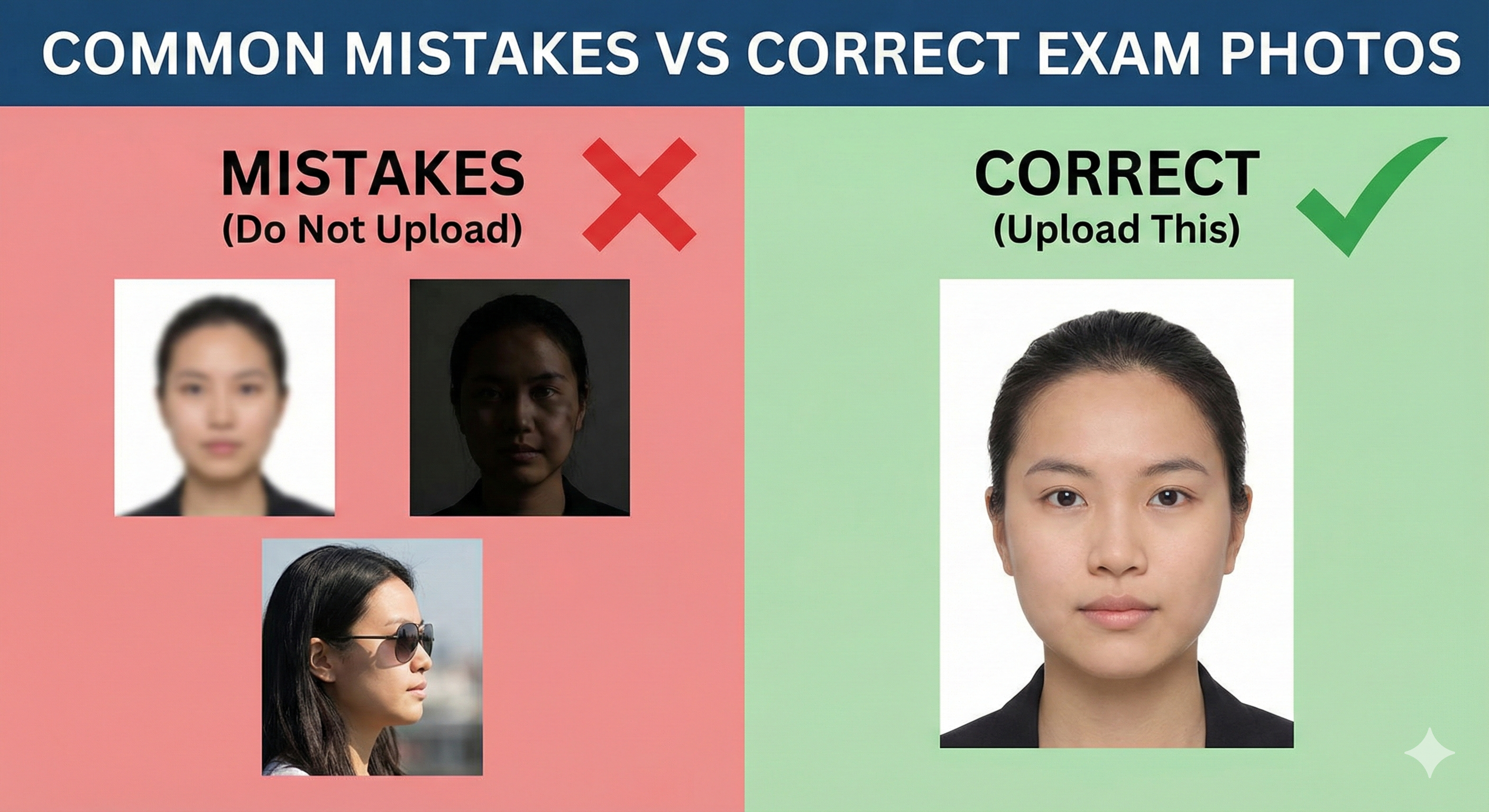
Introduction – Why Photo Upload Errors Are So Common
Every year, hundreds of thousands of exam applications in India are flagged, delayed, or outright rejected — not because the candidate was ineligible, but because of a photograph that didn't meet the portal's specifications.
Exam portals use automated software to scan uploaded images. If your photo's file size, pixel dimensions, background color, or format doesn't match the stated requirements, the system instantly rejects it. And even if the software doesn't catch it, trained invigilators at the exam hall will.
The frustrating part is that these are entirely preventable mistakes. This guide covers the 12 most common photo upload errors seen across NEET, JEE, UPSC, SSC, Kerala PSC, GATE, and other major competitive exams — and tells you exactly how to fix each one.
The 12 Most Common Mistakes (With Fixes)
This is the single most common reason for photo rejection. Most major national exams — NEET, JEE, UPSC, SSC, GATE, IBPS — explicitly require a plain white background. Many students use photos with blue, grey, cream, or even outdoor backgrounds, which fail the automated background check.
Common scenario: A student uses a formal photograph taken at a studio for a school ID — which had a blue background — and submits it for NEET without checking.
Every major exam portal requires JPG/JPEG format. Common problem sources:
- iPhone users: iPhones save photos in HEIC format by default. These look fine on your phone but cannot be uploaded to NTA/UPSC portals.
- Screenshots: Windows screenshots are saved as PNG. Students sometimes screenshot their own photo and try to upload it.
- Edited photos: Saving from Photoshop or Paint as BMP, TIFF, or PNG.
Exam portals reject files that are too large (won't upload) or too small (too low quality). Typical requirements:
- NEET / JEE: 10–200 KB for photo, 4–30 KB for signature
- Kerala PSC: Maximum 30 KB for photo
- SSC: 20–50 KB for photo
- UPSC: 20–300 KB for photo
A modern smartphone photo is 3–8 MB — far too large. A WhatsApp-forwarded compressed image may be under 10 KB — too small.
Front-facing cameras create a "fisheye" effect that makes your face appear wider. They also produce lower resolution photos in many phones. NTA explicitly prohibits selfies for all their exams.
Beyond technical rejection, selfies often have the following problems: uneven lighting, shadow on one side of the face, background objects visible, and your hand holding the phone may appear in the frame.
A blurry photo happens when: the camera isn't focused properly, there's camera shake, the original resolution is too low (e.g., taken at low quality setting), or the photo was forwarded through WhatsApp multiple times (WhatsApp compresses images heavily).
When a low-quality photo is printed on the admit card, it becomes even blurrier and may not be identifiable — causing issues at the exam center.
Different exams require different photo proportions. NEET requires a portrait (3:4 ratio), UPSC requires a square photo (1:1 ratio for some sections), and Kerala PSC uses a 150×200 pixel ratio. Uploading a square photo where a portrait is required stretches or distorts your face.
NTA exams require your face to cover at least 80% of the frame. A photo where you're standing far from the camera (full body visible, small face in the center) will be rejected.
Most exams ask for a photo taken "within the last 6 months." A 2–3 year old photo can cause problems at the exam center if your appearance has changed significantly — different hairstyle, beard grown or shaved, weight changes, etc.
Dark sunglasses, hats, caps, and scarves that cover the face are prohibited in all exam photos. Prescription glasses with regular lenses are usually allowed, but tinted or photochromatic lenses (that darken in sunlight) are not.
A signature made entirely of uppercase printed letters (e.g., "RAHUL SHARMA" in block letters) is not considered a valid signature by any exam authority in India. Your signature must be in your natural, running handwriting style.
Unlike national exams, Kerala PSC requires a text band at the bottom of the photograph containing your name and the date the photo was taken. Uploading a photo without this text band to the Thulasi portal will result in rejection.
This is a unique and often missed requirement for Kerala PSC, KEAM, and some other state exams.
Many candidates complete the upload, see a "success" message, and immediately click submit — without previewing the uploaded image. Sometimes a file uploads in the wrong orientation (rotated 90°), or the cropping removes part of your face, but you only notice this after submission.
📸 Before You Upload Your Photo
Don't risk application rejection! Use our free tool to resize your photo to exact exam specifications.
Create Perfect Exam Photo →