
Let's be real. You signed your name in 2 seconds, but now the exam portal is yelling at you about "Invalid Dimensions" or "File too blurred". Uploading a signature should be easy, but strict AI rules in 2026 make it a headache. If you use a digital pen (like an iPad) or try to "type" your name in a fancy font, stop. That's an instant rejection.
The "Rejection-Proof" Checklist:
- Ink: Black (Safest) or Dark Blue. never Red/Green.
- Paper: Plain White A4. NOT lined notebook paper.
- Method: Real pen on real paper. No digital fonts.
- DPI: Scan it clearly. Don't just take a blurry photo in the dark.
🚀 Create Exam-Ready Signature
Don't struggle with cropping. Our tool auto-crops and resizes your signature perfectly.
Open Signature Resizer →Official 2026 Signature Specs
| Exam | Dimensions (Px) | File Size |
|---|---|---|
| Kerala PSC | 150 x 100 px | 10 KB - 30 KB |
| SSC (CGL/CHSL) | 140 x 60 px | 10 KB - 20 KB |
| IBPS / SBI PO | 140 x 60 px | 10 KB - 20 KB |
| UPSC | 350 x 350 px (approx) | 20 KB - 300 KB |
| NEET / JEE | 3.5 x 1.5 cm | 4 KB - 30 KB |
How to do it (The Foolproof Way)
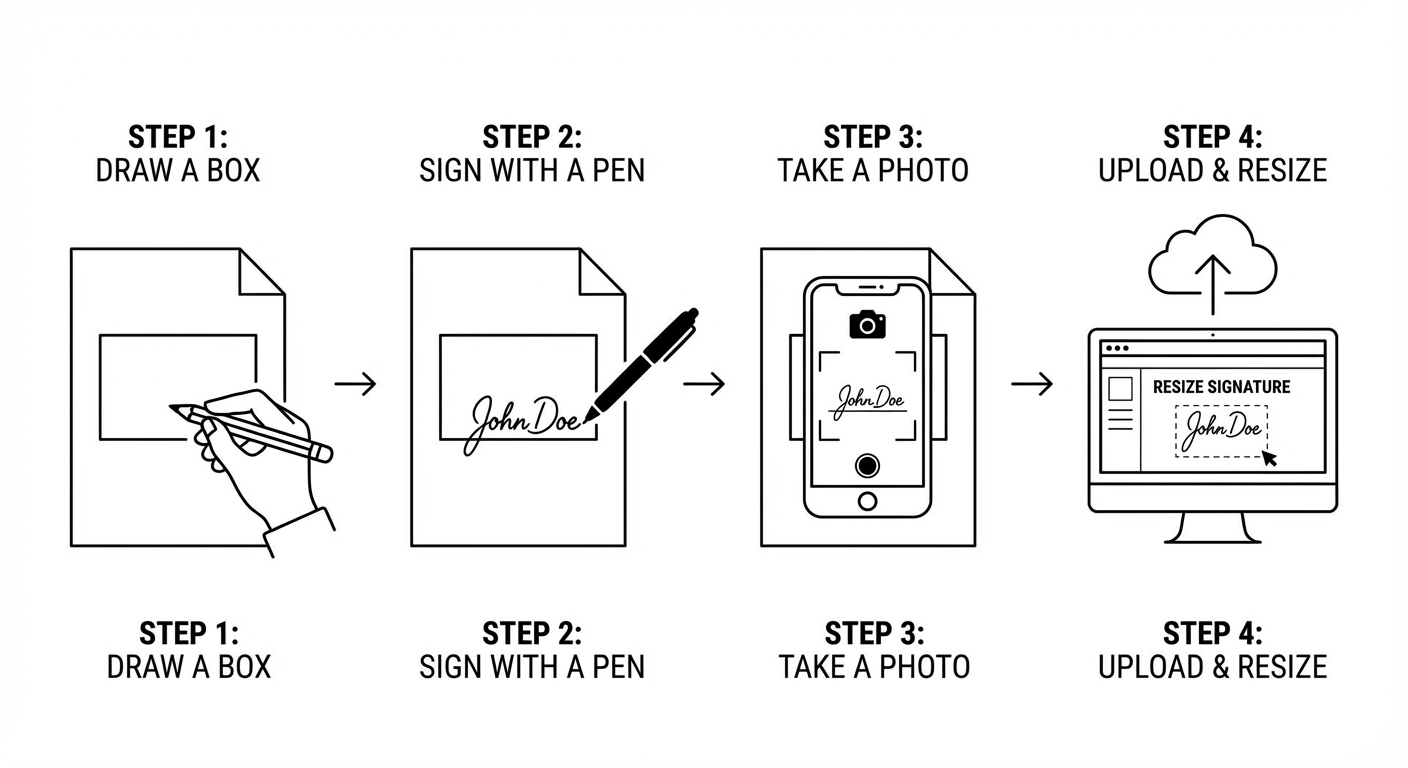
- Draw a Box: Take a white A4 paper. Draw a rectangle (approx 2cm x 5cm) with a pencil.
- Sign Inside: Use a thick Black Gel Pen. Sign clearly. Don't write in all capital letters (unless specified).
- The "Window" Trick: Taking a photo at night causes shadows. Go to a window. Let daylight fall on the paper evenly. Click the photo from directly above.
- Resize: Upload it to our tool. We will turn the greyish background to pure white and fix the size.
Ways to get Rejected
- The "Notebook" Error: Signing on ruled paper (lines going through your name). Instant fail.
- The "Tiny" Sign: Signing very small in the center of a huge image. The computer can't read it. Fill the box.
- The "Shadow" Self-Own: Your phone casts a shadow over the signature when you click it. Tilt your phone slightly to avoid this.
Frequently Asked Questions
What is the standard size for a digital signature?
It varies by exam. Kerala PSC requires 150x100 pixels, while SSC
requires 140x60 pixels. Always check the official notification.